NotifyTV
See calls and notifications from your Android phone on your TV
Mobile apps
Get it on Google Play (new browser tab)- Upvotes
- 0
- DR
- 4 no change since last check
- Followers
- 0
NotifyTV metrics
| Metric | Value |
|---|---|
| Domain Rating | 4 no change since last check |
| Trust Flow | 4 no change since last check |
| Citation Flow | 12 no change since last check |
| Referring domains | 7 no change since last check |
| External backlinks | 12 no change since last check |
Ahrefs Domain Rating scanned 25 Oct 2026, updated 25 Oct 2026. Main topic: Computers/Software/Operating Systems (3). Majestic scanned 25 Oct 2026, updated 25 Oct 2026. Link stats via Majestic. Trust Flow, Citation Flow and Topical Trust Flow are trademarks of Majestic-12 Ltd.
NotifyTV domain facts
| Domain age | 7 months |
|---|---|
| Registered | |
| Expires | |
| Registrar | Cloudflare, Inc. |
| DNSSEC | Not signed |
Free app that displays phone calls, WhatsApp messages and alerts as popups on Android TV or Google TV over your home Wi-Fi, with no account required.
About NotifyTV
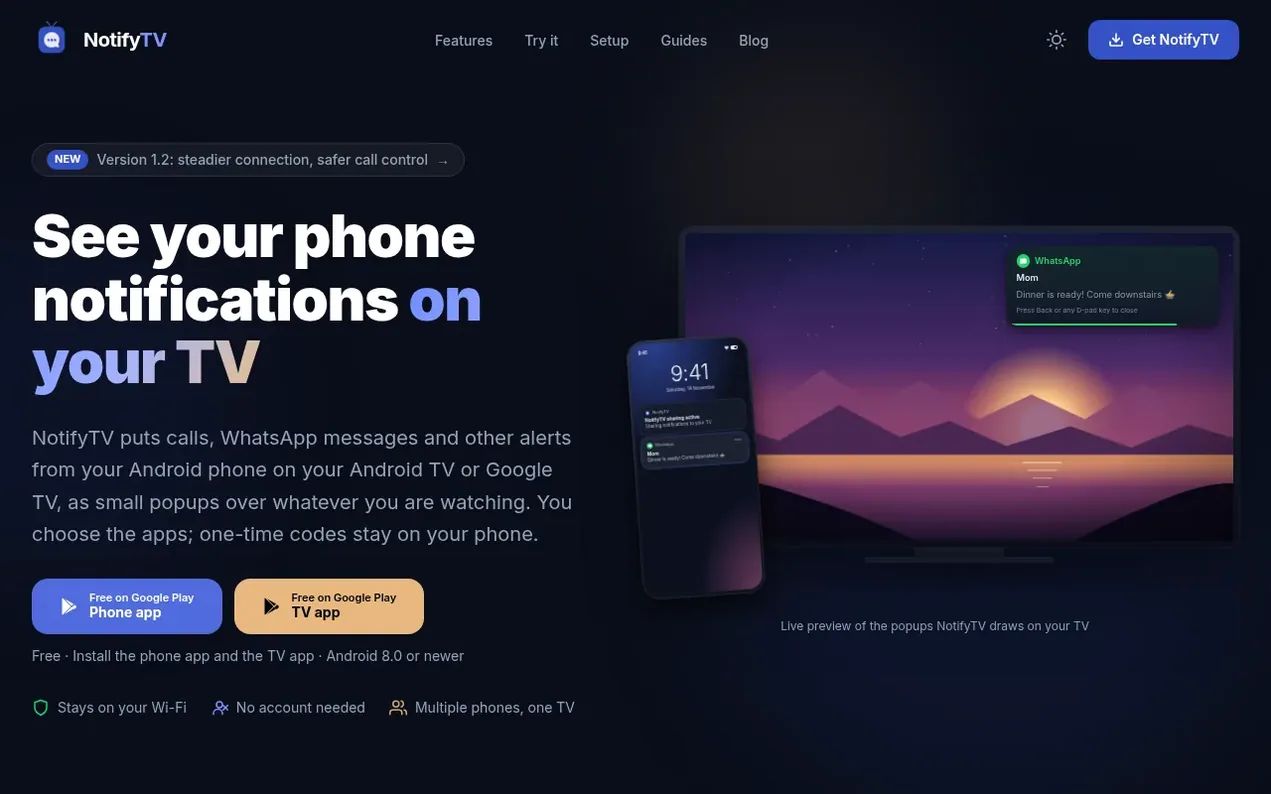
NotifyTV puts calls, WhatsApp messages and other alerts from your Android phone on your Android TV or Google TV, as small popups over whatever you are watching. You choose which apps send notifications; one-time codes stay on your phone by default for privacy. Notifications travel directly from your phone to your TV over your home Wi-Fi and are not uploaded to any server.
The service supports multiple phones connecting to one TV, with each popup showing which phone a message came from. You can decline incoming calls with your TV remote, pause notifications for 1 hour or until 7 AM, or switch to calls-only mode. Privacy controls include a Sender only mode that hides message text and shows only who it's from.
Both the phone app and TV app are free and supported by ads. No account is needed to use the service. The apps work with Android TV 8.0 or newer, Google TV, and require an Android 8.0 or newer phone.
- home automation
- google tv
- notifications
- messaging
Features worth knowing
- See incoming calls on TV with caller name
- Decline calls with TV remote
- Choose which apps send notifications
- Sender only mode hides message text
- Multiple phones to one TV
- Ring phone from TV to find it
- Pause notifications for 1 hour or until 7 AM
- Calls-only mode for Do Not Disturb
- Battery alerts when phone battery is low
Pricing
Pricing model: Free
Both phone app and TV app are free with no premium plans
Compare and explore
FAQ
- Which TVs does NotifyTV work on?
- NotifyTV works on any TV or streaming device with Google TV, or Android TV 8.0 or newer with access to Google Play Store. Compatible devices include Sony, TCL and Hisense TVs with Google TV, Google TV Streamer, Chromecast with Google TV, NVIDIA Shield and onn. Google TV boxes. Your phone needs Android 8.0 or newer.
- Can I see and decline phone calls on the TV?
- Yes, you can see incoming calls from regular SIM and apps like WhatsApp on your TV showing the caller's name. While a call is ringing, you can decline it or dismiss the popup using your TV remote. You answer the call on your phone and the popup closes automatically when answered or when the caller hangs up.
- Does NotifyTV require an account and where do notifications go?
- No account is needed. Notifications travel directly from your phone to your TV over your home Wi-Fi, encrypted for each session, and are not uploaded to any NotifyTV cloud server. The apps show ads; Google AdMob, Firebase and Microsoft Clarity provide ads and analytics.
- What happens if my Wi-Fi drops or my TV turns off?
- The phone reconnects automatically when the TV returns, including after TV restarts or app updates. Notifications that arrive during a short outage (up to a minute) are delivered when reconnected. While the TV is off, the phone stops retrying frequently to save battery and reconnects within minutes when the TV returns.
- Does it work with iPhone, Samsung, LG, Roku or Fire TV?
- No. The phone app is Android only. The TV app comes from Google Play, so it does not run on Samsung (Tizen) or LG (webOS) TVs, Roku, Apple TV or Amazon Fire TV, which has no Google Play. If you plug a Google TV streaming device into one of those TVs, NotifyTV works while you use that device.
Find NotifyTV online
Leave a review for NotifyTV
Nobody has reviewed NotifyTV yet. Start things off.
A review is always free and can never be paid for. Go to the reviews and discussion
Reviews and chat · Product news · Send it on · Run this company? Claim it here · Report it
NotifyTV has a free listing. The owner can unlock the full profile with a paid launch for $5:
- Founder story (locked)
- Milestones (locked)
- Demo video (locked)
- Dofollow website link (locked)
Alternatives to NotifyTV
RoadTally
Private offline vehicle logbook for tracking fuel, maintenance, expenses and service reminders
Bookster
Your Reading Companion
HiRemote
Free Hisense TV remote app for iPhone, iPad, and Apple Watch that pairs in 30 seconds with no account required
Olmi
A simple plant care app for beginners that helps you remember watering, track care history, and build a routine that sticks
Mobile Apps0 votes. Log in to add your vote for Olmi