SummarizeVideoToText
AI video summarizer that turns YouTube, TikTok, and Instagram videos into concise, readable summaries
- Upvotes
- 0
- DR
- 16 +2 (up) since last check
- Followers
- 0
Paste any video link and get an AI-generated summary, full transcript, timestamped chapters, and interactive mind map in seconds.
About SummarizeVideoToText
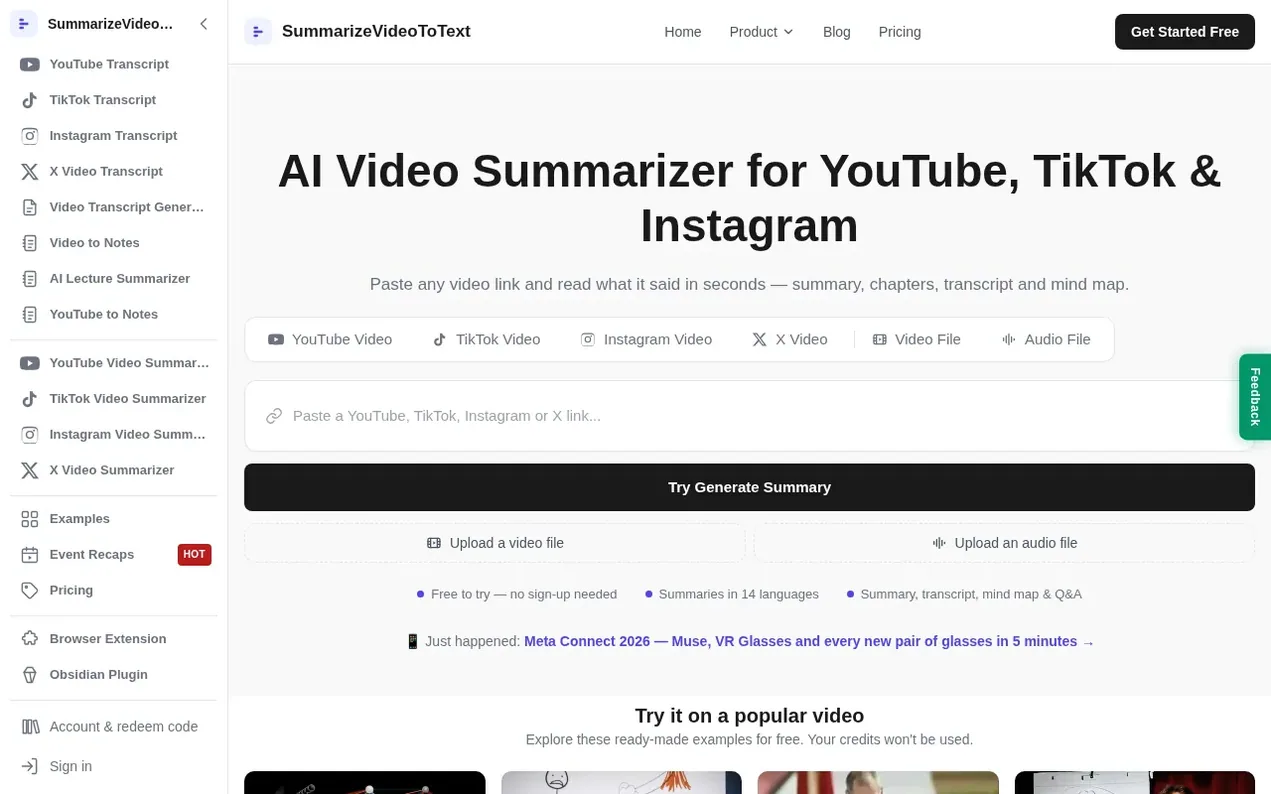
SummarizeVideoToText is an AI video summarizer that converts the spoken content of YouTube, TikTok, and Instagram videos into written text. Users paste a video link to receive a structured text workspace containing a concise summary, full transcript with timestamps, logical chapters, and an interactive mind map with a Q&A panel.
The tool works in the browser with no installation required. Videos with existing captions are processed instantly, while AI transcription is available for videos without captions. Summaries are generated in 14 languages independently of the video's original language.
Features include instant transcription, AI-powered summaries with key insights, chapters with timestamps for navigation, an interactive mind map, and the ability to export results to Obsidian and Notion. Users can start with 20 free trial credits and continue with subscription or pay-as-you-go options.
- youtube tools
- tiktok tools
- note-taking
- video summarizer
- ai summary
- productivity
- transcription
Features worth knowing
- Instant transcription from existing captions
- AI-powered summaries with key insights and chapter breakdowns
- Timestamped chapters for video navigation
- Interactive mind map and Q&A panel
- Export to Obsidian and Notion
- Process diagrams powered by VizText
- Summaries in 14 languages
- Chrome and Edge extension for YouTube
- Obsidian plugin for note integration
- Support for YouTube, TikTok, Instagram, and X videos
Pricing
Pricing model: Freemium
Free trial: 20 credits (once, no card required). Monthly subscription: $9/month for 1000 credits. Annual subscription: $54/year for 12000 credits. Pay as you go: $1 for 100 credits (first purchase), $5 for 400 credits (regular top-up). Existing subtitles cost 1 credit/minute; AI transcription costs
SummarizeVideoToText metrics
| Metric | Value |
|---|---|
| Domain Rating | 16 +2 (up) since last check |
| Trust Flow | 12 no change since last check |
| Citation Flow | 31 no change since last check |
| Referring domains | 93 no change since last check |
| External backlinks | 4,808 no change since last check |
Ahrefs Domain Rating scanned 26 Oct 2026, updated 26 Oct 2026. Main topic: Society/People (12). Majestic scanned 25 Oct 2026, updated 25 Oct 2026. Link stats via Majestic. Trust Flow, Citation Flow and Topical Trust Flow are trademarks of Majestic-12 Ltd.
SummarizeVideoToText domain facts
Reveal the domain facts
| Domain age | 2 months |
|---|---|
| Registered | |
| Expires | |
| Registrar | Alibaba Cloud Computing Ltd. d/b/a HiChina (www.net.cn) |
| DNSSEC | Not signed |
Compare and explore
FAQ
- How do I summarize a YouTube video to text?
- Paste the YouTube URL into the box at the top of the page and press Summarize. Within seconds you'll see the AI summary streaming in, alongside the full transcript, timestamped chapters, a mind map, and a Q&A panel — all generated from that one link.
- Is summarizing videos to text free?
- You can start with 20 credits once, without a card. Existing subtitles cost 1 credit/minute while AI transcription costs 10 credits/minute, including the summary. Videos are rounded up to full minutes with a 10-credit minimum per video. Your own existing results and the homepage reference videos are free to reopen.
- Do I need to create an account?
- You can try a public video link without creating an account. Sign in to keep your remaining trial balance and watch history, upload files, or ask questions about videos you have processed. Signing in does not grant another trial.
- What languages are supported?
- The tool supports 14 output languages: English, Simplified Chinese, Spanish, French, German, Japanese, Korean, Portuguese, Russian, Hindi, Indonesian, Vietnamese, Italian, and Arabic. The output language is independent of the language spoken in the video.
- How long can the video be?
- Without an account, videos up to 15 minutes work. A free account raises that to 1 hour, and Pro goes up to 6 hours — enough for lectures, talks and long podcasts.
Leave a review for SummarizeVideoToText
Nobody has reviewed SummarizeVideoToText yet. Start things off.
A review is always free and can never be paid for. Go to the reviews and discussion
Reviews and chat · Product news · Send it on · Run this company? Claim it here · Report it
SummarizeVideoToText has a free listing. The owner can unlock the full profile with a paid launch for $5:
- Founder story (locked)
- Milestones (locked)
- Demo video (locked)
- Dofollow website link (locked)
Alternatives to SummarizeVideoToText
Kling 4.0
AI video generator that creates realistic videos up to 30 seconds from text or images with native 4K resolution and synchronized audio
AI Media Generation1 votes. Log in to add your vote for Kling 4.0Blinkvid
AI short video generator for TikTok, Instagram Reels, and YouTube Shorts
AI Media Generation0 votes. Log in to add your vote for BlinkvidPalette
AI tool to colorize black and white photos with realistic colors and 21+ filters
AI Media Generation0 votes. Log in to add your vote for PaletteDubpro.ai
AI video dubbing and localization platform
AI Media Generation0 votes. Log in to add your vote for Dubpro.ai