PDF to Brainrot AI
Turn PDFs and study notes into engaging video content with AI narration and gameplay backgrounds
- Upvotes
- 0
- DR
- 0 no change since last check
- Followers
- 0
PDF to Brainrot AI converts PDFs and notes into study videos with AI narration, gameplay backgrounds, and captions in 10 languages.
About PDF to Brainrot AI
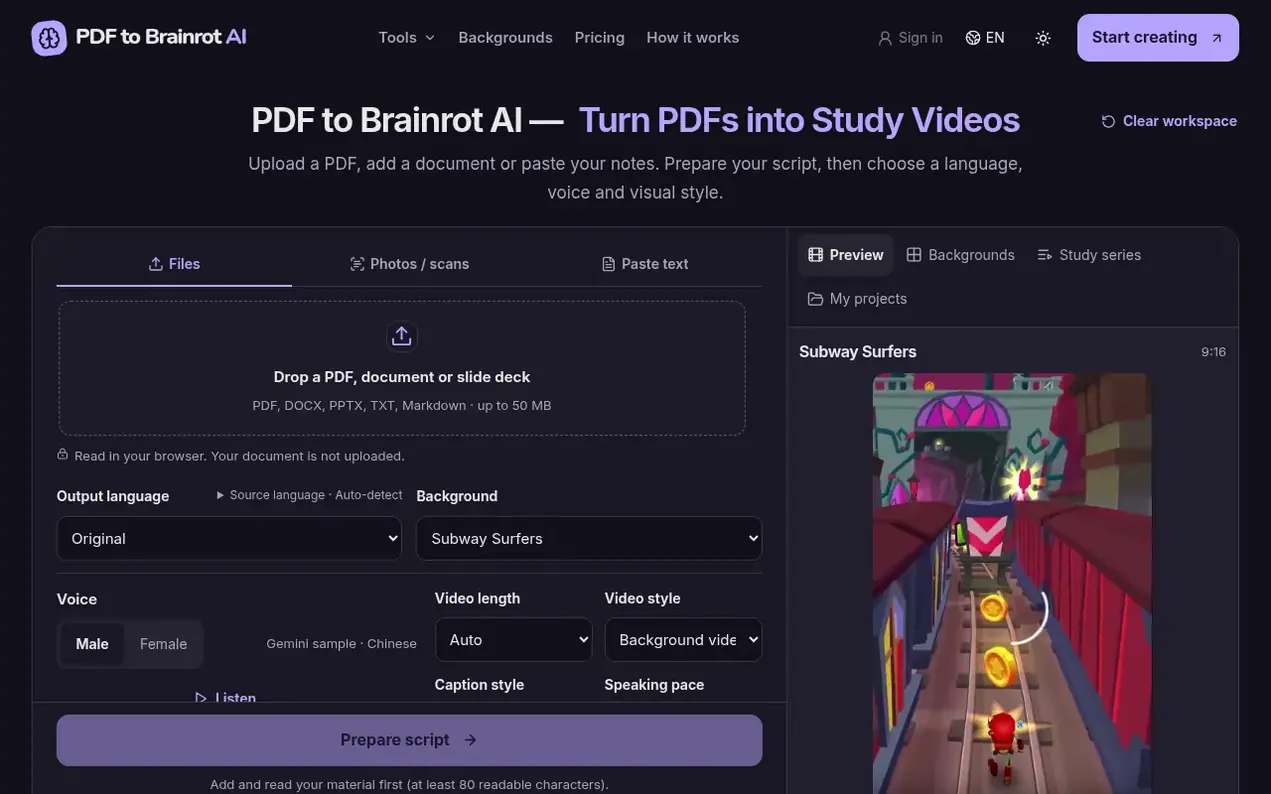
PDF to Brainrot AI transforms study materials into short video content. Users upload PDFs, Word documents, slides, or paste notes, then review an auto-generated script extracted from the source material. The tool offers 10 gameplay backgrounds, multiple narration voices, and support for 10 languages with matching narration. Videos are limited to five minutes and can be exported as MP4 files with captions in SRT or VTT format.
The platform uses a credit-based system rather than subscriptions. Credits are consumed based on video duration at a rate of five credits per 30 seconds of video. The service processes documents locally in the browser without uploading original files, and users must verify the generated script against their source material before generation.
- study videos
- pdf to video
- ai video generation
- study materials
- ai narration
Features worth knowing
- Support for 10 languages with matching AI narration
- 10 gameplay backgrounds to choose from
- Upload PDF, Word, PowerPoint, text or paste notes
- Export to MP4 with SRT or VTT subtitles
- Up to 5 minutes video length
- Six narration voices to choose from
- Save and import projects
- Ad-free workspace
Pricing
Pricing model: Paid
Basic: $9.90 USD for 100 credits (enough for 10 one-minute videos); Study bundle: $49.00 USD for 1,000 credits (enough for 100 one-minute videos). Credits are consumed at five per 30 seconds of video. Purchased credits do not expire.
Follow PDF to Brainrot AI and hear about their milestones, new launches and demo videos by email. Stop any time.
PDF to Brainrot AI metrics
| Metric | Value |
|---|---|
| Domain Rating | 0 no change since last check |
| Trust Flow | 0 no change since last check |
| Citation Flow | 0 no change since last check |
| Referring domains | 0 no change since last check |
| External backlinks | 0 no change since last check |
Ahrefs Domain Rating scanned 19 Nov 2026, updated 18 Nov 2026. Majestic scanned 18 Nov 2026, updated 18 Nov 2026. Link stats via Majestic. Trust Flow, Citation Flow and Topical Trust Flow are trademarks of Majestic-12 Ltd.
PDF to Brainrot AI domain facts
Reveal the domain facts
| Domain age | 22 days |
|---|---|
| Registered | |
| Expires | |
| Registrar | Spaceship, Inc. |
| DNSSEC | Signed |
PDF to Brainrot AI launch results
| Measure | At launch, then latest |
|---|---|
| Domain Rating (Ahrefs) | 0 first measured 18 Nov 2026 |
| Trust Flow (Majestic) | 0 first measured 18 Nov 2026 |
| Referring domains (Majestic) | 0 first measured 18 Nov 2026 |
Day 0 since launch. Next receipt: day 30, 18 Dec 2026. The figures report a change; they do not say what caused it, and many things can. No figure here is a guess.
Launching something soon?
Free tips from Best Digital Launch for getting ready, launch day, the week after and what to do next.
- Set up
- On launch day
- The days after
- Beyond launch
Compare and explore
FAQ
- Which files can I use?
- You can use a PDF, DOCX, PPTX, UTF-8 TXT or Markdown file up to 50 MB, or paste notes. PDFs can have up to 1,000 pages with scanned-text recognition supporting English and Chinese for up to 20 PDF pages per run.
- How long can a video be?
- The product limit is five minutes per video. Rendering can trim or loop background footage to match the narration length without repeating the script or captions.
- Is my PDF uploaded?
- No, documents are read in your browser without uploading the original file. AI translation sends selected text only after your confirmation.
- Can I choose another output language?
- Scripts and narration follow the source language. Cross-language translation is not enabled.
- Should I check the script before generating?
- Yes, you should check numbers, names and qualifications against the source before continuing to ensure accuracy.
Leave a review for PDF to Brainrot AI
Nobody has reviewed PDF to Brainrot AI yet. Start things off.
A review is always free and can never be paid for. Go to the reviews and discussion
Reviews and chat · Product news · Send it on · Run this company? Claim it here · Report it
PDF to Brainrot AI has a free listing. The owner can unlock the full profile with a paid launch for $5:
- Founder story (locked)
- Milestones (locked)
- Demo video (locked)
- Dofollow website link: not on this free listing (its website link is nofollow)
Alternatives to PDF to Brainrot AI
Facy
Browser-based AI image and video editor for face swaps, head swaps, upscaling, and background removal
AI Media Generation10 votes. Log in to add your vote for FacyCicilili
AI music video generator for your songs
AI Media Generation3 votes. Log in to add your vote for CicililiSkryve
Turn videos into knowledge with visual AI analysis
AI Media Generation3 votes. Log in to add your vote for SkryveTurbogen
AI video and image studio with 28 models, pay per generation, no subscription
AI Media Generation1 votes. Log in to add your vote for Turbogen