
Motion Transfer AI
Animate character photos with reference video motion
- Upvotes
- 0
- DR
- 40 −4 (down) since last check
- Followers
- 0
Motion Transfer AI metrics
| Metric | Value |
|---|---|
| Domain Rating | 40 −4 (down) since last check |
| Trust Flow | 21 no change since last check |
| Citation Flow | 32 no change since last check |
| Referring domains | 184 no change since last check |
| External backlinks | 7,190 no change since last check |
Ahrefs Domain Rating scanned 17 Oct 2026, updated 17 Oct 2026. Main topic: Society/People (21). Majestic scanned 15 Oct 2026, updated 15 Oct 2026. Link stats via Majestic. Trust Flow, Citation Flow and Topical Trust Flow are trademarks of Majestic-12 Ltd.
Motion Transfer AI domain facts
| Domain age | 1 year |
|---|---|
| Registered | |
| Expires | |
| Registrar | Spaceship, Inc. |
| DNSSEC | Not signed |
Motion Transfer AI animates still photos by transferring movement from reference videos. Upload a character photo and motion video, choose your model settings
About Motion Transfer AI
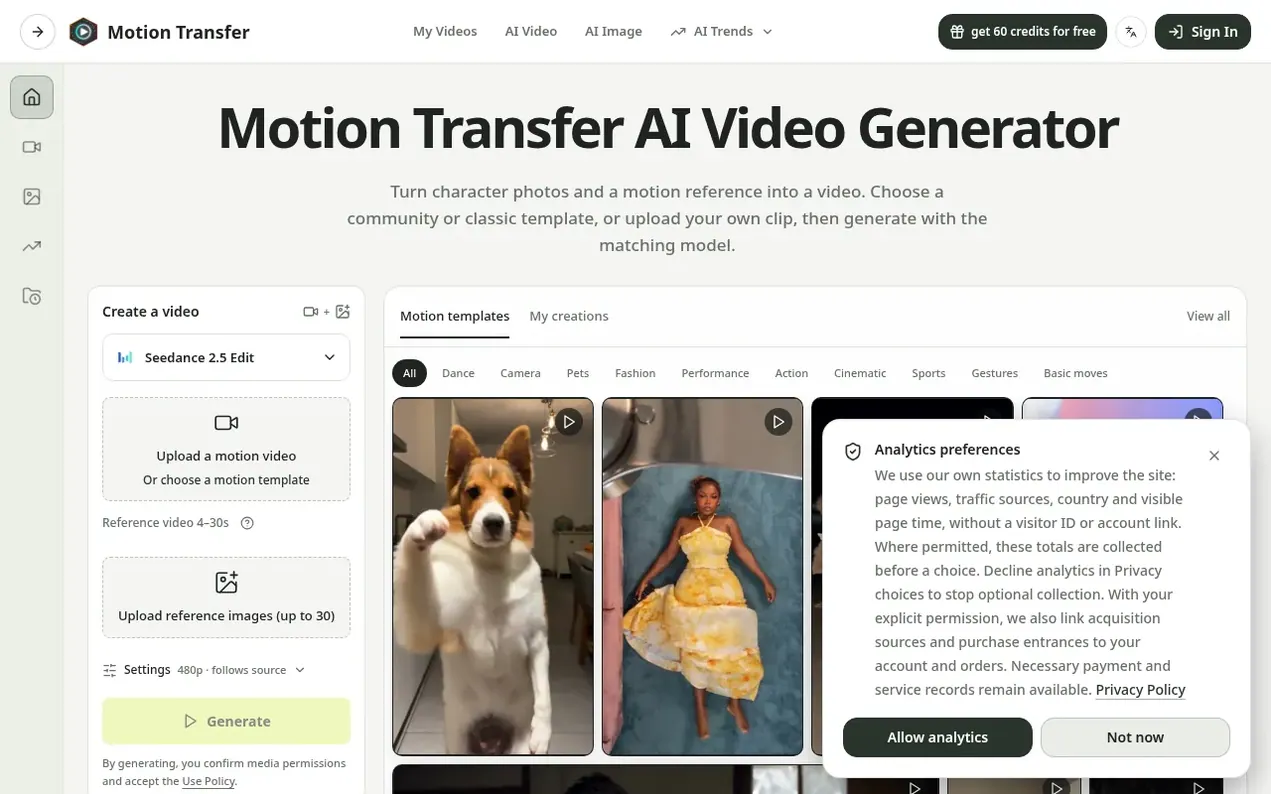
Motion Transfer AI is an online tool that combines character photos with motion reference videos to create animated clips. Users upload a single photo or multiple reference images along with a video showing desired movement, then select from available AI models like Kling 2.6, Kling 3.0, Wan 2.2, or Seedance variants. The platform offers adjustable settings including resolution options and composition matching modes before generating the final video.
The service supports multiple file formats and video lengths depending on the chosen model. Kling and Wan models work with single photos and reference videos of 3-30 seconds, while Seedance models accept multiple reference images plus motion videos of varying durations. A credit-based system determines generation costs based on model choice, resolution, and clip length.
- video-generation
- ai video
- template-based
- character animation
- ai animation
- motion transfer
- reference video
Features worth knowing
- Multiple AI models: Kling 2.6, Kling 3.0, Wan 2.2, Seedance 2.0, and Seedance 2.5
- Resolution options from 480p to 4K
- Pre-made motion templates organized by category
- Match photo and Match video orientation settings
- Support for multiple reference images with Seedance
- Credit cost estimation before generation
- Optional scene detail text prompts for Kling models
- Generation history and account management
- Watermark-free downloads on paid plans
Pricing
Pricing model: Freemium
Free tier: 18 starting credits. Starter: $8.3/month ($100/year), 2,400 credits/year. Pro: $30/month ($360/year, normally $49.9/month), 21,600 credits/year. Business: $49.9/month ($599/year, normally $99.9/month), 48,000 credits/year. All plans include watermark-free downloads, generation history, an
Compare and explore
FAQ
- What files can I use with Motion Transfer AI?
- For Kling 2.6 and Kling 3.0, upload one JPEG or PNG image up to 10 MB. Wan 2.2 also accepts WebP. Seedance 2.0 and Seedance 2.5 accept multiple reference images plus a motion video. Seedance reference videos can be 2–15 seconds for 2.0 or 2–30 seconds for 2.5; Kling and Wan accept 3–30 seconds.
- How long can the motion reference be?
- Kling 2.6 and Kling 3.0 accept 3–10 seconds with Match photo, or 3–30 seconds with Match video. Wan accepts 3–30 seconds. You should trim longer recordings to one continuous action before adding them to Motion Transfer AI.
- What do Match photo and Match video mean?
- These Kling settings choose whether character orientation follows the photo or the video. Match photo supports reference clips up to 10 seconds; Match video supports up to 30 seconds.
- Which model and resolution should I choose?
- The workspace offers Kling 2.6 Motion Control, Kling 3.0 Motion Control, Wan 2.2 Animate Move, Wan 2.2 Animate Replace, Seedance 2.0, and Seedance 2.5. Kling and Wan keep one-photo motion transfer. Seedance is for multi-image plus video templates. Start with the default Kling model if you are exploring, then switch when a template or reference set needs Seedance.
- Does Motion Transfer AI need a text prompt?
- The motion comes from the reference video. Kling 2.6 and Kling 3.0 offer optional Scene details for a scene note; Wan Move and Wan Replace have no prompt field. Choose the motion first instead of relying on text to invent a different gesture. If you add a scene note, keep it consistent with the photo and the action you are supplying.
Leave a review for Motion Transfer AI
Nobody has reviewed Motion Transfer AI yet. Start things off.
A review is always free and can never be paid for. Go to the reviews and discussion
Reviews and chat · Product news · Send it on · Run this company? Claim it here · Report it
Motion Transfer AI has a free listing. The owner can unlock the full profile with a paid launch for $5:
- Founder story (locked)
- Milestones (locked)
- Demo video (locked)
- Dofollow website link (locked)
Alternatives to Motion Transfer AI
CamArt AI
AI studio for generating images, video, and audio from social media playbooks
AI Media Generation0 votes. Log in to add your vote for CamArt AIAigazou
Free AI image and video generator without login or limits
AI Media Generation0 votes. Log in to add your vote for AigazouAnimeWall
AI anime wallpaper generator creating original HD desktop backgrounds from text prompts
AI Media Generation0 votes. Log in to add your vote for AnimeWallShotra
AI video generator for image to video and text to video creation
AI Media Generation0 votes. Log in to add your vote for Shotra