
ControllerOverlay
Live PS5, PS4 and Xbox controller overlays for OBS streaming
- Upvotes
- 0
- DR
- 3 +3 (up) since last check
- Followers
- 0
A browser-based overlay that displays your controller inputs live on stream, showing button presses and light effects as you play. Works with OBS, Streamlabs
About ControllerOverlay
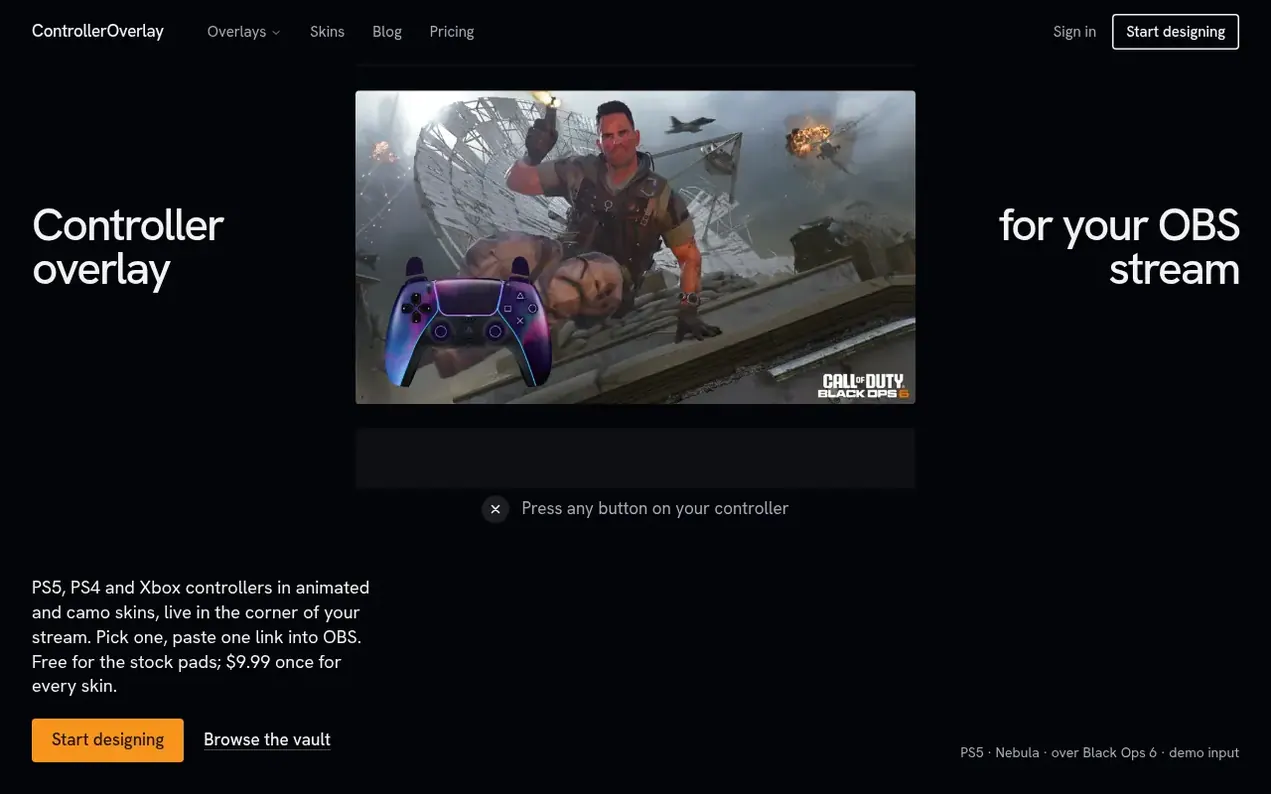
ControllerOverlay puts a live picture of your controller on your stream. You pick a PS5, PS4 or Xbox layout and a skin in the studio, and you get one link to add as a browser source in OBS. When you press a button, your viewers see it light up.
The service supports PS5 DualSense, PS4 DualShock 4 and Xbox controllers connected over USB or Bluetooth. A free account includes the stock looks for all three controllers, your permanent overlay link and an automatic Bluetooth button fix. The paid vault unlocks all skins, custom colors for buttons and lights, and allows you to add your name to the pad.
Changes to your design appear on stream within about 12 seconds without re-pasting the link or refreshing OBS. The overlay has a transparent background so only the controller appears over your gameplay. The site is made and run by one independent developer with no team, investors or advertising.
- controller overlay
- input display
- ps5 ps4 xbox
- streaming overlay
- browser source
- gamepad viewer
- obs streaming
Features worth knowing
- Animated controller skins with camo designs for PS5, PS4 and Xbox
- Real-time button press visualization with light effects
- Customizable button colors, light colors and display modes
- Persistent OBS link that updates without re-pasting
- Transparent background for overlay over gameplay
- USB and Bluetooth controller support with automatic button fix
- Works in OBS, Streamlabs and TikTok LIVE Studio
- Custom skins generated from text description in one minute
- Button calibrator for Bluetooth controllers
- Customizable name display on controller touchpad
Pricing
Pricing model: Freemium
Free: stock PS5, PS4 and Xbox controller overlays, permanent OBS link, Bluetooth fix. Vault: $9.99 one-time payment for all skins, custom button and light colors, name on pad. Additional skin packs: 4 skins for $6.99, 10 skins for $14.99, 24 skins for $29.99.
Follow ControllerOverlay and hear about their milestones, new launches and demo videos by email. Stop any time.
ControllerOverlay metrics
| Metric | Value |
|---|---|
| Domain Rating | 3 +3 (up) since last check |
| Trust Flow | 0 no change since last check |
| Citation Flow | 0 no change since last check |
| Referring domains | 0 no change since last check |
| External backlinks | 0 no change since last check |
Ahrefs Domain Rating scanned 19 Nov 2026, updated 19 Nov 2026. Majestic scanned 14 Nov 2026, updated 14 Nov 2026. Link stats via Majestic. Trust Flow, Citation Flow and Topical Trust Flow are trademarks of Majestic-12 Ltd.
ControllerOverlay domain facts
Reveal the domain facts
| Domain age | 10 days |
|---|---|
| Registered | |
| Expires | |
| Registrar | Spaceship, Inc. |
| DNSSEC | Not signed |
ControllerOverlay launch results
| Measure | At launch, then latest |
|---|---|
| Domain Rating (Ahrefs) | 0 to 0 no change since launch 14 Nov 2026, then 18 Nov 2026 |
| Trust Flow (Majestic) | 0 first measured 14 Nov 2026 |
| Referring domains (Majestic) | 0 first measured 14 Nov 2026 |
Day 5 since launch. Next receipt: day 30, 14 Dec 2026. The figures report a change; they do not say what caused it, and many things can. No figure here is a guess.
Launching something soon?
Free tips from Best Digital Launch for getting ready, launch day, the week after and what to do next.
- Set up
- On launch day
- The days after
- Beyond launch
Compare and explore
FAQ
- How do I add the controller overlay to OBS?
- Add a Browser Source to your scene and paste your overlay link into the URL field. Set the width to 800 and the height to 600. The background is transparent, so only the controller shows over your game.
- Which controllers does it support?
- PS5 DualSense, PS4 DualShock 4 and Xbox controllers, plugged in over USB or paired over Bluetooth. The site reads your pad through the browser Gamepad API, so it shows up once you press a button.
- What is free and what is in the vault?
- A free account gives you the stock PS5, PS4 and Xbox looks, your permanent OBS link and the Bluetooth fix. The vault adds every skin on all three controllers, three skins made from your own description, and button, light and name colours.
- Is the vault a subscription?
- No. The vault costs $9.99, paid once. There is no monthly fee and nothing to renew.
- Can I get a refund?
- Yes. Email support@controlleroverlay.com within 14 days of buying the vault and it will be refunded in full. After a refund the vault closes on your account and your overlay link goes back to the stock look.
Leave a review for ControllerOverlay
Nobody has reviewed ControllerOverlay yet. Start things off.
A review is always free and can never be paid for. Go to the reviews and discussion
Reviews and chat · Product news · Send it on · Run this company? Claim it here · Report it
ControllerOverlay has a free listing. The owner can unlock the full profile with a paid launch for $5:
- Founder story (locked)
- Milestones (locked)
- Demo video (locked)
- Dofollow website link: not on this free listing (its website link is nofollow)
Alternatives to ControllerOverlay
Voobin
Free AI movies, films, drama and original AI series platform
Streaming & entertainment0 votes. Log in to add your vote for VoobinWorld Radio Online
Listen to radio stations from around the world online
Streaming & entertainment0 votes. Log in to add your vote for World Radio OnlineRunway Now
Live fashion week streams, schedule and runway replays
Streaming & entertainment0 votes. Log in to add your vote for Runway NowKROMA
Your library, on your own hardware. One Rust binary, no subscription, on every screen you own.
Streaming & entertainment0 votes. Log in to add your vote for KROMA